
Spaces: Follow Businesses
Wix.com, INC.Productivity
4.26.77K Reviews
- Version
- 2.131646.0
- Installs
- 10.00M
- Age Rating
- Everyone
Screenshots




Our Review of Spaces: Follow Businesses
 Analysis by Appyee
I tend to be cautious with apps that try to gather shopping, appointments, and community updates in one place. They can be convenient, but they can also become cluttered quickly. After spending time with Spaces: Follow Businesses, I found its main appeal is more focused: it gives you a single mobile place to keep up with businesses and communities that use Wix.com, INC. rather than making you check every individual site separately.
It is a free productivity app for Android, rated for Everyone, and its current version is 2.131646.0. The app has built a sizeable audience, with over ten million installs, a 4.2 average from around ninety-five thousand ratings, and roughly six thousand eight hundred written reviews. Those figures suggest that the idea works for many people, although the experience depends heavily on whether the businesses, clubs, creators, or local groups you care about are active inside Spaces.
My overall impression is that this is less of a general-purpose social network and more of a personal directory for services and communities. I would recommend it to someone who regularly books appointments, orders from local businesses, or follows several Wix-powered communities. I would not install it expecting a universal replacement for a browser, a messaging app, or a dedicated booking service.
How Spaces feels in its current form
The first thing I noticed is that the app makes more sense when you already have a reason to use it. Perhaps a hairdresser tells you to follow its updates through Spaces, a fitness instructor shares a community there, or a local shop asks customers to place orders through its mobile presence. In those situations, the app acts as a convenient front door.
Without those existing connections, the value is less immediate. You are not simply opening an endless feed and discovering a complete world of businesses. You need to find or join the spaces that matter to you. That is an important distinction because it shapes who will enjoy the app: people with several relevant businesses or groups in their routine will get more from it than someone who only wants occasional online shopping.
The interface is built around switching between different business and community spaces. That approach is useful because each space can keep its own identity and information rather than mixing every update into one noisy timeline. I found this especially helpful when separating a service provider from a community group. A booking reminder, a product announcement, and a discussion post do not feel like the same kind of information, and keeping them connected to their source makes them easier to understand.
The best way to use Spaces is as a compact dashboard for places you already trust. I would begin by adding only the businesses and groups I visit regularly. Following too many spaces at once can make the app feel more like another inbox, while a smaller collection turns it into something practical that I can check quickly.
What the main tools are good for
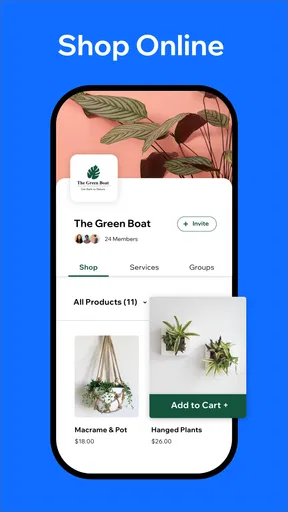
Ordering online is one of the clearest use cases. If a business has configured its Wix presence for purchasing, Spaces can save you from repeatedly searching for the same website. This is handy for repeat orders, especially when the business is local and you already know what you want. I see it as a shortcut to familiar sellers rather than a marketplace for comparing hundreds of unknown products.
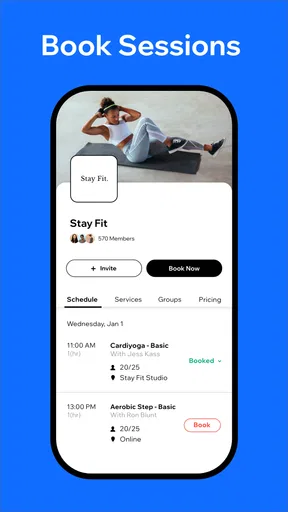
Appointments are another strong reason to keep it installed. For a regular haircut, class, consultation, or similar service, having the business space nearby can reduce the number of browser tabs and saved contacts involved. The practical benefit is not just making the initial booking; it is having a consistent place to return to when you need the same service again.
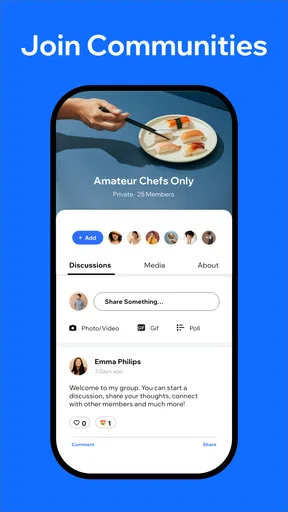
Communities give the app a different character. A group can use its space to share updates and keep members connected, which is more organized than scattering announcements across email, social networks, and chat threads. I like this model for groups where information needs to remain associated with the organization rather than disappearing in a fast-moving conversation.
There is also a useful distinction between following a community and actively participating in it. Someone may only want announcements, while another person may need to interact more regularly. Before committing to every notification option, I would decide whether I am using a space as a noticeboard, a booking tool, or a place for ongoing involvement. That small choice helps prevent unnecessary alerts.
A realistic everyday routine
Imagine that I use the same salon, attend a weekly class, and buy specialty food from a neighborhood business. Instead of saving three separate browser shortcuts, I can keep their spaces together. On Monday, I check the class community for an update. Later in the week, I book a salon appointment from its business area. At the weekend, I place a repeat order with the food shop.
That routine shows where the app earns its place. None of those actions is difficult in a browser, but repeating the search process every time creates small amounts of friction. Spaces turns those familiar destinations into a more direct path. The advantage becomes more noticeable when the businesses publish updates or make scheduling part of their regular customer service.
There is a trade-off, though. If one of those businesses rarely updates its space, the app does not magically make the relationship more useful. Its value comes from the quality and activity of the individual spaces, not simply from installing the application. I would judge it by the businesses I need, rather than by the overall size of its user community.
What the product’s evolution means for users
The app was released on August 28, 2016, and its current version shows that it has continued to evolve rather than remaining a one-purpose booking shortcut. That history matters because Spaces now sits between several familiar categories: business directories, appointment tools, online ordering portals, and private community apps.
From a user’s perspective, the evolution is most visible in the breadth of tasks the app is intended to support. Earlier expectations for a business companion might have centered on finding information or contacting a company. Today, the same kind of app is expected to help with transactions, reservations, and ongoing engagement. Spaces reflects that broader direction, but it still keeps the individual business or community at the center.
The current release runs on Android 8.0 or later, which makes it accessible to people using older supported devices. That is helpful if you do not replace your phone frequently. At the same time, anyone using a device close to that minimum should keep ordinary expectations about performance: an app that brings together several kinds of content may feel less comfortable on older hardware than on a recent phone.
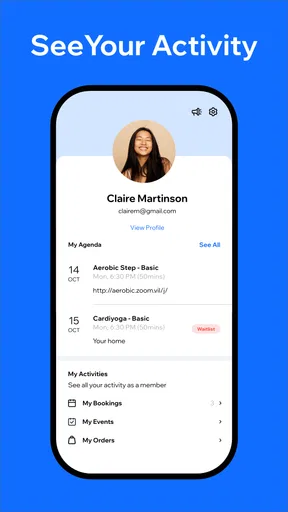
For existing users, the most important effect of continued development is continuity. If you already rely on several spaces, you are not treating the app as a one-time download. You are building a collection of recurring destinations. Changes to navigation, notifications, or the way a business presents its services can therefore affect habits that have become part of your weekly routine.
I recommend taking a few minutes after an update to review how you move between spaces and how alerts are presented. This is not because every update causes a problem, but because multi-purpose apps can gradually accumulate options. A quick review helps you keep the app aligned with what you actually use instead of allowing every space to compete for attention.
Where it beats the usual alternatives
The browser remains the most flexible alternative. If I need to visit a business only once, searching the web is probably faster than installing an app and creating a collection of spaces. A browser also works better when I want to compare unrelated businesses or research something outside the Wix ecosystem.
Dedicated booking apps can be better for people whose entire routine revolves around appointments. They may feel more direct when all of your providers are already available in one specialized service. Spaces has a different advantage: it can combine appointments with ordering and community updates, so I do not need a separate category of app for every relationship.
Social networks are often more active for broad discovery and public conversation. However, they can bury a local business announcement among unrelated posts. Spaces is more useful when I want updates tied to a particular business or group and do not want to depend on a general social feed.
Email is still preferable for formal records and messages I need to search later. I would not treat Spaces as my only archive for receipts, appointment details, or important instructions unless the business itself makes that workflow clear. The app is convenient for access and engagement, while email and browser pages may remain better for long-term reference.
Small workflow improvements that make a difference
One of my favorite practical habits is to separate discovery from maintenance. I would use a browser or a direct invitation to find a business, then use Spaces for repeat visits. This avoids filling the app with spaces that looked interesting once but have no place in my routine.
A second useful habit is to check the business identity before placing an order or booking an appointment. A familiar logo or name is not enough by itself when several businesses have similar names. I would confirm that the space belongs to the provider I intend to use, particularly when the action involves a payment or a scheduled visit.
Third, I would treat community spaces differently from service spaces. Service spaces are usually task-oriented: book, order, or check an update. Community spaces may require more attention because posts and conversations can accumulate. Keeping those purposes mentally separate makes it easier to decide which alerts deserve immediate attention and which can wait.
Another overlooked benefit is reducing repeated signpost hunting. When a business changes how it presents its booking or ordering options, a saved space can be more useful than an old bookmark that points to a page no longer central to the customer journey. That does not eliminate every navigation issue, but it gives regular users a more stable starting point.
Where the experience still has friction
The biggest limitation is dependence on participation. Spaces cannot provide a rich experience for a business or community that has not set up an active presence. You may install the app with a clear intention and still find that the businesses you care about use another platform. In that case, the application becomes an extra layer rather than a solution.
The combined purpose can also feel broad. Ordering, appointments, and communities are related through businesses, but they are not identical activities. I sometimes prefer a focused app that does one task exceptionally clearly. Spaces is at its best when those tasks belong to the same group of businesses I already use; it is less convincing when I only need one of them.
There is a learning curve in understanding what each space offers. One business may emphasize bookings, another may focus on updates, and a community may organize information differently again. That flexibility is useful for organizations, but it means users cannot assume that every space will behave in exactly the same way.
Notification management deserves attention as well. An app connected to multiple businesses and communities can become distracting if every update feels equally urgent. I would start with conservative notification choices and expand them only for spaces where timing genuinely matters. For a class schedule or appointment change, an alert may be valuable; for routine promotional news, it may not be.
Privacy and account comfort are also personal considerations. Some people are happy to keep their business relationships inside one app, while others prefer visiting each provider independently. If you are uncomfortable centralizing these interactions, the browser may be a better fit. Spaces is designed around continuity, and that is precisely what some users will appreciate and others will want to avoid.
I would also skip it if I rarely interact with local businesses online, do not join organized communities, and dislike maintaining multiple app-based accounts. The free price removes a financial barrier, but it does not remove the time cost of learning another interface or managing another source of notifications.
Questions I would consider before installing
If you are wondering whether it replaces every business app, my answer is no. It can bring several Wix-based experiences together, but it is not a universal directory or a guaranteed gateway to every provider. Its usefulness starts with the specific businesses and communities you want to follow.
If you only need to make a single appointment, I would probably use the provider’s website instead. The app becomes easier to justify when the appointment is recurring, when you want updates from the provider, or when the same organization also offers ordering and community interaction.
If you are concerned about getting overwhelmed, begin with one or two spaces. Use the app for a week, notice which actions you actually perform, and then decide whether adding more businesses improves your routine. This approach is more reliable than joining everything at once and judging the app through a wall of irrelevant alerts.
If you already use the app, the sensible question is not whether it has every possible feature, but whether your current spaces remain useful. Remove inactive or irrelevant ones, revisit the spaces that support recurring tasks, and keep important confirmations in a separate place when you need a dependable record.
What I would watch in future use
The next stage of the product should be judged by how smoothly it handles the tension between breadth and simplicity. Adding more ways for businesses to interact with customers can be useful, but every new option also risks making the experience harder to scan. I would rather see clearer separation between booking, ordering, and community activity than a crowded screen that tries to display everything at once.
I would also watch how well the app serves people who follow many spaces. The small-scale experience is straightforward when I have only a few regular destinations. The larger test is whether the app can help me find the right update quickly without turning into another feed that demands constant sorting.
For communities, organization will matter as much as activity. A busy space is not automatically a helpful one. I would look for ways to make recurring information easy to locate, especially when members need schedules, instructions, or announcements rather than casual conversation.
For businesses, consistency will determine whether customers return. A polished space that rarely reflects current services is less useful than a modest one that keeps its booking and ordering paths clear. Users should pay attention to that practical quality instead of assuming that every business space offers the same level of care.
After using it, I see Spaces: Follow Businesses as a worthwhile companion for people whose everyday routines already connect them to Wix-powered businesses and communities. It is free, broadly accessible, and more versatile than a simple directory, but its value is personal rather than universal. I would recommend starting with a small set of trusted spaces, keeping alerts under control, and using the app for repeat interactions where it genuinely saves time.
My final verdict is positive with a clear condition: install it when you have real places or groups to follow. If you do, it can turn scattered business visits into a manageable mobile routine. If you do not, a browser or a specialized appointment tool will probably feel lighter. The app’s future success will depend less on offering everything and more on making the spaces people already rely on feel dependable, organized, and easy to return to.
Verdict
Strengths of Spaces: Follow Businesses
- Follow local businesses and discover updates in one dedicated feed.
- Useful for keeping up with openings, events, offers, and business announcements.
- Clean, focused experience without the distractions of a general social network.
- Helps users support nearby shops and services more easily.
- Business posts can make it easier to find relevant local recommendations.
Limitations of Spaces: Follow Businesses
- The app is less useful if few businesses in your area are active on it.
- Content quality and frequency depend heavily on participating businesses.
- Some users may find another social feed unnecessary for simple updates.
- You may need to follow many accounts before the feed feels worthwhile.
- Availability of features and businesses may vary by location.
Similar Picks in This Category
View All
Google Calendar
Google LLC4.6

Google Drive
Google LLC4.3

Google Assistant
Google LLC3.9

Microsoft OneDrive
Microsoft Corporation4.6

Samsung Calendar
Samsung Electronics Co., Ltd.4.1

Microsoft OneNote: Save Notes
Microsoft Corporation4.6
Frequently Asked Questions
What is Spaces: Follow Businesses, and how does it work?
Spaces: Follow Businesses is an app designed to help you keep up with businesses, brands, creators, and local places you are interested in. After creating an account, you can search for participating businesses, follow their Spaces, and view updates, announcements, offers, or other shared content in one organized feed. The exact features available may depend on the business and your location.
Do I need an account to use Spaces: Follow Businesses?
You may be able to browse certain public information without registering, but an account is generally useful for following businesses and receiving personalized updates. Signing in can also allow the app to remember your interests, manage followed Spaces, and provide notifications. Before registering, review the requested permissions and privacy information so you understand how your profile and activity may be handled.
Can Spaces: Follow Businesses help me discover local businesses and offers?
The app can be useful for discovering businesses and keeping their updates in one place, particularly when those businesses actively maintain their Spaces. You may find announcements, promotions, events, or service information, although the quality and frequency of content will vary. It should be treated as a convenient communication and discovery tool rather than a complete directory of every local business.
Does the app send notifications, and can I control them?
Spaces: Follow Businesses may send notifications when a followed business publishes new content or shares an important update. Notifications can be helpful if you want timely information, but frequent alerts may become distracting depending on how many Spaces you follow. You can usually manage notification preferences inside the app or through your Android or iOS device settings, including disabling alerts completely.
Is Spaces: Follow Businesses free to download and use?
The app may be available to download at no initial cost, but availability of specific features can depend on the platform, business, region, or account type. Some businesses may promote paid products or services through their Spaces, and normal mobile data charges can apply when loading content away from Wi-Fi. Check the official store listing for current pricing, subscriptions, and in-app purchase details before downloading.
